Friday, 25 July 2014

Eclipse Shortcuts by Quontra Solutions

Editors are an integral part of a programmer’s life. If you have good proficiency in using an editor thats a great advantage. It comes very handy to debug. Traditional notepad and SOPs (System.out.println) are the way we start learning a language but that is not sufficient, so beginners start using an IDE and most importantly know the shortcuts.
For java developers there is a huge list and some popular areEclipse, Netbeans, IntelliJ Idea. I use Eclipse as my IDE and vim as a light weight editor.
Keyboard shortcuts are very important for comfortable and quick editing. We have abridged the following list of eclipse shortcuts from my own experience and literature.
There is a huge list of eclipse shortcuts available but I have listed only the most essential ones that you may need daily

File Navigation – Eclipse Shortcuts

  • CTRL SHIFT R – Open a resource. You need not know the path and just part of the file name is enough.
  • CTRL E – Open a file (editor) from within the list of all open files.
  • CTRL PAGE UP or PAGE DOWN – Navigate to previous or next file from within the list of all open files.
  • ALT <- or ALT -> – Go to previous or next edit positions from editor history list.

Java Editing – Eclipse Shortcuts

  • CTRL SPACE – Type assist
  • CTRL SHIFT F – Format code.
  • CTRL O – List all methods of the class and again CTRL O lists including inherited methods.
  • CTRL SHIFT O – Organize imports.
  • CTRL SHIFT U – Find reference in file.
  • CTRL / – Comment a line.
  • F3 – Go to the declaration of the variable.
  • F4 – Show type hierarchy of on a class.
  • CTRL T – Show inheritance tree of current token.
  • SHIFT F2 – Show Javadoc for current element.
  • ALT SHIFT Z – Enclose block in try-catch.

General Editing – Eclipse Shortcuts

  • F12 – Focus on current editor.
  • CTRL L – Go to line number.
  • CTRL D – Delete a line.
  • CTRL <- or -> – Move one element left or right.
  • CTRL M – Maximize editor.
  • CTRL SHIFT P – Go to the matching parenthesis.

Debug, Run – Eclipse Shortcuts

  • CTRL . or , – Navigate to next or previous error.
  • F5 – Step into.
  • F6 – Step over.
  • F8 – Resume
  • CTRL Q – Inspect.
  • CTRL F11 – Run last run program.
  • CTRL 1 – Quick fix code.

Search – Eclipse Shortcuts

  • CTRL SHIFT G – Search for current cursor positioned word reference in workspace
  • CTRL H – Java search in workspace.

Tuesday, 22 July 2014

How to set Permanent Path of JDK in Windows

For setting the permanent path of JDK, you need to follow these steps:
  • Go to MyComputer properties -> advanced tab -> environment variables -> new tab of user variable -> write path in variable name -> write path of bin folder in variable value -> ok -> ok -> ok

For Example:

1)Go to MyComputer properties
how to set path in java
2)click on advanced tab
how to set path in java
3)click on environment variables
how to set path in java
4)click on new tab of user variables
how to set path in java
5)write path in variable name
how to set path in java
6)Copy the path of bin folder
how to set path in java
7)paste path of bin folder in variable value
how to set path in java
8)click on ok button
how to set path in java
9)click on ok button
how to set path in java
Now your permanent path is set.You can now execute any program of java from any drive.

For more Visit: http://www.quontrasolutions.com/blog/category/java

Sunday, 20 July 2014

Operators in java

Operator is a special symbol that is used to perform operations. There are many types of operators in java such as unary operator, arithmetic operator, relational operator, shift operator, bitwise operator, ternary operator and assignment operator.
Precedence of Operators
Operators Precedence
postfix expr++ expr--
unary ++expr --expr +expr -expr ~ !
multiplicative * / %
additive + -
shift << >> >>>
relational < > <= >= instanceof
equality == !=
bitwise AND &
bitwise exclusive OR ^
bitwise inclusive OR |
logical AND &&
logical OR ||
ternary ? :
assignment = += -= *= /= %= &= ^= |= <<= >>= >>>=

Wednesday, 16 July 2014

Java Naming conventions

Java naming convention is a rule to follow as you decide what to name your identifiers such as class, package, variable, constant, method etc.
But, it is not forced to follow. So, it is known as convention not rule.
All the classes, interfaces, packages, methods and fields of java programming language are given according to java naming convention.

Advantage of naming conventions in java

By using standard Java naming conventions, you make your code easier to read for yourself and for other programmers. Readability of Java program is very important. It indicates that less time is spent to figure out what the code does.


Name Convention
class name should start with uppercase letter and be a noun e.g. String, Color, Button, System, Thread etc.
interface name should start with uppercase letter and be an adjective e.g. Runnable, Remote, ActionListener etc.
method name should start with lowercase letter and be a verb e.g. actionPerformed(), main(), print(), println() etc.
variable name should start with lowercase letter e.g. firstName, orderNumber etc.
package name should be in lowercase letter e.g. java, lang, sql, util etc.
constants name should be in uppercase letter. e.g. RED, YELLOW, MAX_PRIORITY etc.

Object in Java

An entity that has state and behavior is known as an object e.g. chair, bike, marker, pen, table, car etc. It can be physical or logical (tengible and intengible). The example of integible object is banking system.
An object has three characteristics:
  • state: represents data (value) of an object.
  • behavior: represents the behavior (functionality) of an object such as deposit, withdraw etc.
  • identity: Object identity is typically implemented via a unique ID. The value of the ID is not visible to the external user. But,it is used internally by the JVM to identify each object uniquely.
For Example: Pen is an object. Its name is Reynolds, color is white etc. known as its state. It is used to write, so writing is its behavior.

Object is an instance of a class. Class is a template or blueprint from which objects are created. So object is the instance(result) of a class.

For more Visit: http://www.quontrasolutions.com/blog/category/java

Class in Java


A class is a group of objects that has common properties. It is a template or blueprint from which objects are created.
A class in java can contain:
  • data member
  • method
  • constructor
  • block
  • class and interface

Syntax to declare a class:

  1. class <class_name>{  
  2.     data member;  
  3.     method;  
  4. }  

Simple Example of Object and Class

In this example, we have created a Student class that have two data members id and name. We are creating the object of the Student class by new keyword and printing the objects value.
  1. class Student1{  
  2.  int id;//data member (also instance variable)  
  3.  String name;//data member(also instance variable)  
  4.   
  5.  public static void main(String args[]){  
  6.   Student1 s1=new Student1();//creating an object of Student  
  7.   System.out.println(s1.id);  
  8.   System.out.println(s1.name);  
  9.  }  
  10. }


Tuesday, 15 July 2014

Difference between JDK, JRE and JVM

JVM

JVM (Java Virtual Machine) is an abstract machine. It is a specification that provides runtime environment in which java bytecode can be executed.
JVMs are available for many hardware and software platforms. JVM, JRE and JDK are platform dependent because configuration of each OS differs. But, Java is platform independent.
The JVM performs following main tasks:
  • Loads code
  • Verifies code
  • Executes code
  • Provides runtime environment

JRE

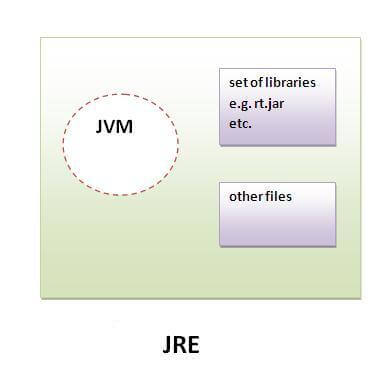
JRE is an acronym for Java Runtime Environment.It is used to provide runtime environment.It is the implementation of JVM.It physically exists.It contains set of libraries + other files that JVM uses at runtime.
Implementation of JVMs are also actively released by other companies besides Sun Micro Systems.
jre

JDK


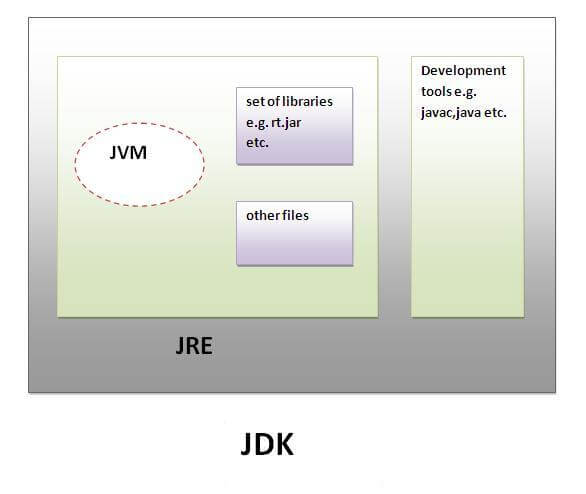
JDK is an acronym for Java Development Kit.It physically exists.It contains JRE + development tools.
jdk

Friday, 11 July 2014

Why java uses Unicode System?

Before Unicode, there were many language standards:
  • ASCII (American Standard Code for Information Interchange) for the United States.
  • ISO 8859-1 for Western European Language.
  • KOI-8 for Russian.
  • GB18030 and BIG-5 for chinese, and so on.
This caused two problems:
  1. A particular code value corresponds to different letters in the various language standards.
  2. The encodings for languages with large character sets have variable length.Some common characters are encoded as single bytes, other require two or more byte.
To solve these problems, a new language standard was developed i.e. Unicode System.
In unicode, character holds 2 byte, so java also uses 2 byte for characters.
lowest value:\u0000
highest value:\uFFF

For more Visit: http://www.quontrasolutions.com/blog/category/java

Thursday, 10 July 2014

Variable and Datatype in Java

Variable

Variable is name of reserved area allocated in memory.
variable in java
int data=50;//Here data is variable

Types of Variable

There are three types of variables in java
  • local variable
  • instance variable
  • static variable
types of variable

Local Variable

A variable that is declared inside the method is called local variable.

Instance Variable

A variable that is declared inside the class but outside the method is called instance variable . It is not declared as static.

Static variable

A variable that is declared as static is called static variable. It cannot be local.
We will have detailed learning of these variables in next chapters.

Example to understand the types of variables

class A{

int data=50;//instance variable

static int m=100;//static variable

void method(){
int n=90;//local variable
}

}//end of class


Data Types in Java

In java, there are two types of data types
  • primitive data types
  • non-primitive data types
datatype in java

Data Type Default Value Default size
boolean false 1 bit
char ‘\u0000′ 2 byte
byte 0 1 byte
short 0 2 byte
int 0 4 byte
long 0L 8 byte
float 0.0f 4 byte
double 0.0d 8 byte

Wednesday, 9 July 2014

Internal Architecture of JVM

Let’s understand the internal architecture of JVM. It contains classloader, memory area, execution engine etc. Jvm Internal

1) Classloader:

Classloader is a subsystem of JVM that is used to load class files.

2) Class(Method) Area:

Class(Method) Area stores per-class structures such as the runtime constant pool, field and method data, the code for methods.

3) Heap:

It is the runtime data area in which objects are allocated.

4) Stack:

Java Stack stores frames.It holds local variables and partial results, and plays a part in method invocation and return.
Each thread has a private JVM stack, created at the same time as thread.
A new frame is created each time a method is invoked. A frame is destroyed when its method invocation completes.

5) Program Counter Register:

PC (program counter) register. It contains the address of the Java virtual machine instruction currently being executed.

6) Native Method Stack:

It contains all the native methods used in the application.

7) Execution Engine:


It contains:
1) A virtual processor
2) Interpreter:Read bytecode stream then execute the instructions.
3) Just-In-Time(JIT) compiler:It is used to improve the performance.JIT compiles parts of the byte code that have similar functionality at the same time, and hence reduces the amount of time needed for compilation.Here the term ?compiler? refers to a translator from the instruction set of a Java virtual machine (JVM) to the instruction set of a specific CPU.

For more Visit: http://www.quontrasolutions.com/blog/category/java

Monday, 7 July 2014

JVM (Java Virtual Machine)

JVM (Java Virtual Machine) is an abstract machine. It is a specification that provides runtime environment in which java bytecode can be executed.
JVMs are available for many hardware and software platforms (i.e.JVM is plateform dependent).

What is JVM?

It is:
  1. A specification where working of Java Virtual Machine is specified. But implementation provider is independent to choose the algorithm. Its implementation has been provided by Sun and other companies.
  2. An implementation Its implementation is known as JRE (Java Runtime Environment).
  3. Runtime Instance Whenever you write java command on the command prompt to run the java class, and instance of JVM is created.

What it does?

The JVM performs following operation:
  • Loads code
  • Verifies code
  • Executes code
  • Provides runtime environment
JVM provides definitions for the:
  • Memory area
  • Class file format
  • Register set
  • Garbage-collected heap
  • Fatal error reporting etc.
For more Visit: http://www.quontrasolutions.com/blog/category/java

Friday, 4 July 2014

How to setup path in Java

The path is required to be set for using tools such as javac, java etc.
If you are saving the java source file inside the jdk/bin directory, path is not required to be set because all the tools will be available in the current directory.
But If you are having your java file outside the jdk/bin folder, it is necessary to set path of JDK.
There are 2 ways to set java path:
  1. temporary
  2. permanent

1) How to set Temporary Path of JDK in Windows

To set the temporary path of JDK, you need to follow following steps:
  • Open command prompt
  • copy the path of jdk/bin directory
  • write in command prompt: set path=copied_path

For Example:

set path=C:\Program Files\Java\jdk1.6.0_23\bin
Let’s see it in the figure given below:

how to set path in java


For more Visit: http://www.quontrasolutions.com/blog/category/java

Thursday, 3 July 2014

What happens at runtime?

At runtime, following steps are performed:
what happens at runtime when simple java program runs
Classloader: is the subsystem of JVM that is used to load class files.
Bytecode Verifier: checks the code fragments for illegal code that can violate access right to objects.
Interpreter: read bytecode stream then execute the instructions

For more Visit: http://www.quontrasolutions.com/blog/category/java

Wednesday, 2 July 2014

What happens at compile time?

At compile time, java file is compiled by Java Compiler (It does not interact with OS) and converts the java code into bytecode.


compilation of simple java program

For more Visit: http://www.quontrasolutions.com/blog/category/java

Tuesday, 1 July 2014

What is Java

Java is a programming language and a platform.
Platform Any hardware or software environment in which a program runs, known as a platform. Since Java has its own Runtime Environment (JRE) and API, it is called platform.

Java Example


  1. class Simple{
  2.     public static void main(String args[]){
  3.      System.out.println(“Hello Java”);
  4.     }
  5. }